
The scientific journal version of this article is available here: Dapper vs EF Core: A Practical Performance Comparison in .NET
The benchmark release with source materials is available here: efcore-vs-dapper v1.0.0
Choosing a data-access technology in a .NET application is not just a matter of personal preference. It affects latency, memory allocations, garbage collection pressure, maintainability, and sometimes even infrastructure cost under load.
In many enterprise .NET systems, the choice often comes down to two popular approaches:
- Entity Framework Core: a full-featured ORM that gives you productivity, LINQ queries, change tracking, migrations, and a high-level persistence model.
- Dapper: a lightweight micro-ORM that keeps you close to SQL and focuses on fast mapping with minimal abstraction.
The common answer is usually: “EF Core is more convenient, Dapper is faster.”
But how big is the difference? And in which scenarios does it actually matter?
To answer that, we benchmarked EF Core and Dapper using PostgreSQL, .NET, and BenchmarkDotNet across several realistic read, join, update, and parallel-query scenarios.
Test Environment
The benchmark was executed against PostgreSQL 17.6 using .NET 10 and BenchmarkDotNet. The database was recreated in a controlled environment, and test data was generated deterministically using a fixed seed.
The goal was not to test a synthetic micro-operation in isolation, but to measure a more realistic end-to-end data-access path:
- query construction;
- database round-trip;
- row materialization;
- mapping into objects;
- memory allocation.
The test schema represented a small e-commerce domain with products, orders, and order items.
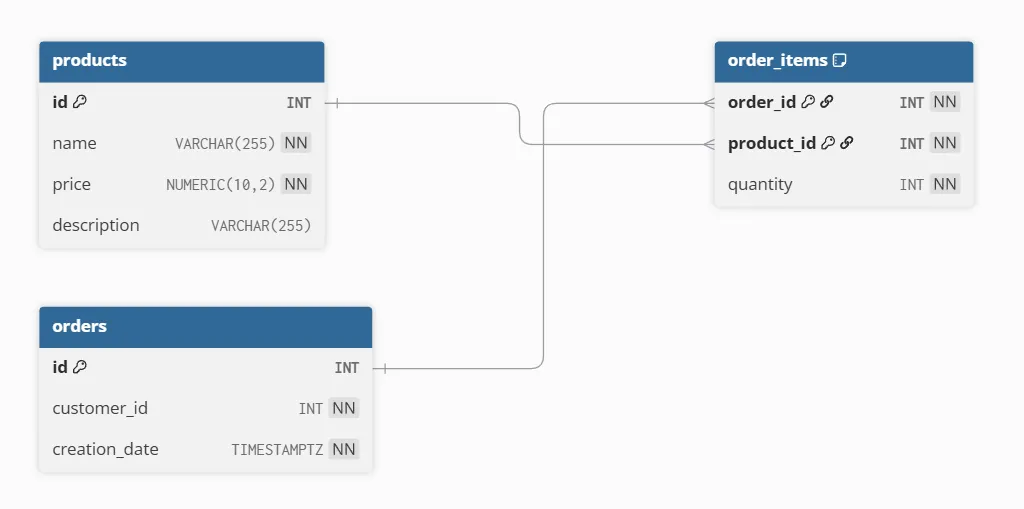
Figure 1. Database schema with products, orders, and order_items tables.
The workload included single-row reads by primary key, filtered reads, paginated reads over different table sizes, join-heavy order selection, simple updates, complex updates, and parallel reads with a high degree of concurrency.
For read scenarios, EF Core was configured with no-tracking queries to avoid unnecessary change tracking overhead. EF Core compiled queries were also tested as a separate variant.
During the source-code review performed for this study, we also identified and reported a redundant nullable-conversion operation in Dapper’s asynchronous query path. This finding is mentioned as an implementation-level observation and is not included in the benchmark evaluation.
Dapper GitHub Issue #2184: Unused value in QueryAsync
Why Allocations Matter
Latency is important, but it is not the only metric that matters in managed runtimes like .NET.
If a data-access layer allocates more memory per request, that memory eventually has to be cleaned up by the garbage collector. Under sustained load, this can increase GC frequency and lead to worse tail latency.
In other words, even when two approaches look close in average execution time, the one that allocates less memory may behave more predictably under production load.
That is why the benchmark measured both execution time, in microseconds per operation, and managed memory allocations, in KB or MB per operation.
Simple Read: Dapper Has a Small but Clear Advantage
In the single-row product lookup scenario, Dapper showed lower execution time and lower memory allocation compared with the EF Core baseline.
EF Core compiled queries improved the read path, but they did not eliminate the allocation difference completely.
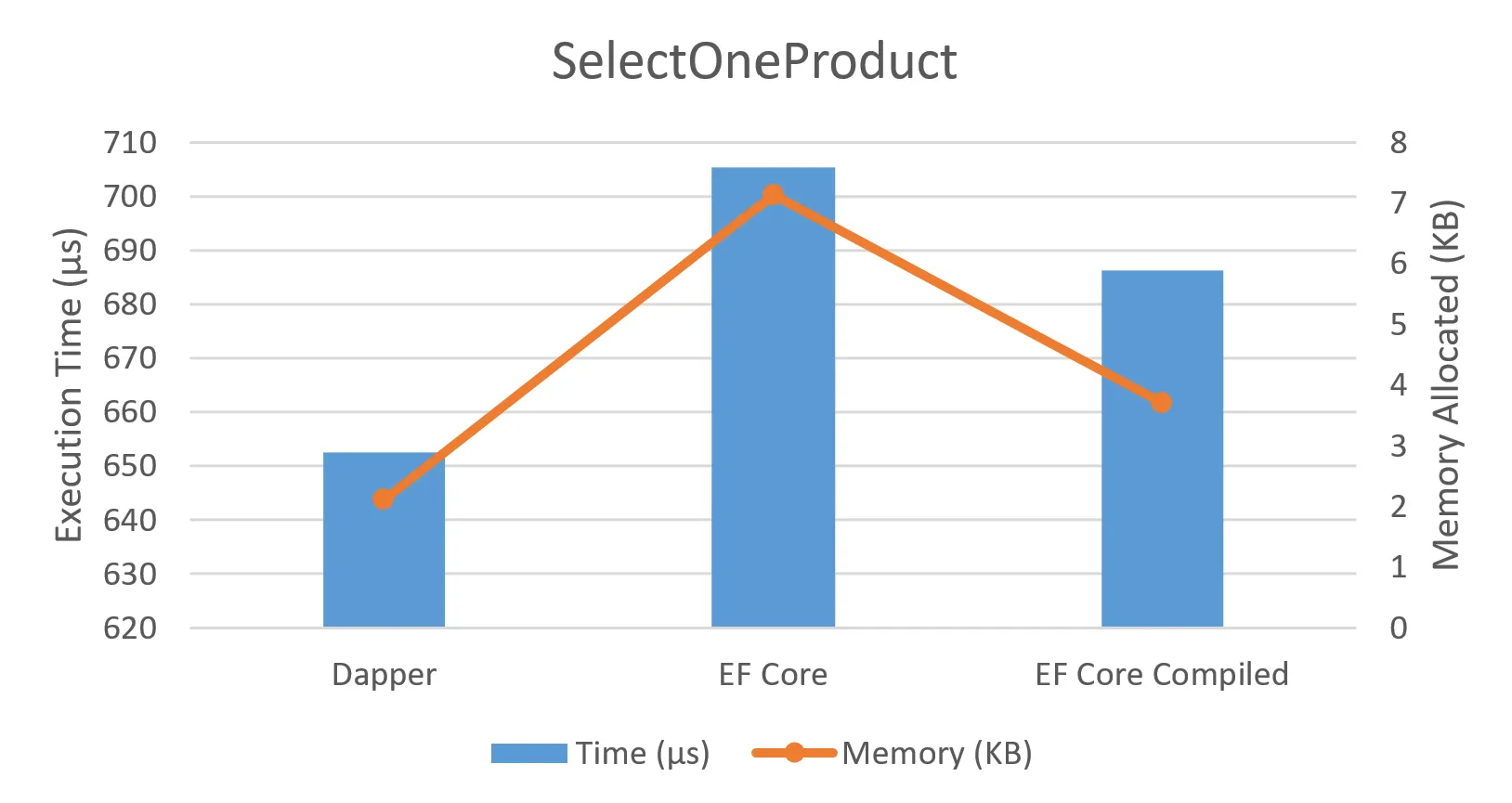
Figure 2. SelectOneProduct execution time and memory allocation for Dapper, EF Core, and EF Core compiled queries.
This is an important result because simple reads are common in backend services. However, the difference here is not dramatic. For many business applications, this alone may not justify replacing EF Core with Dapper.
The more interesting results appear when query complexity grows.
Bulk Reads: The Gap Narrows as Data Volume Grows
When selecting many products, the relative difference between Dapper and EF Core became smaller as the total execution time increased.
Dapper still remained faster in the benchmark, but the gap was less dramatic compared with more complex scenarios.
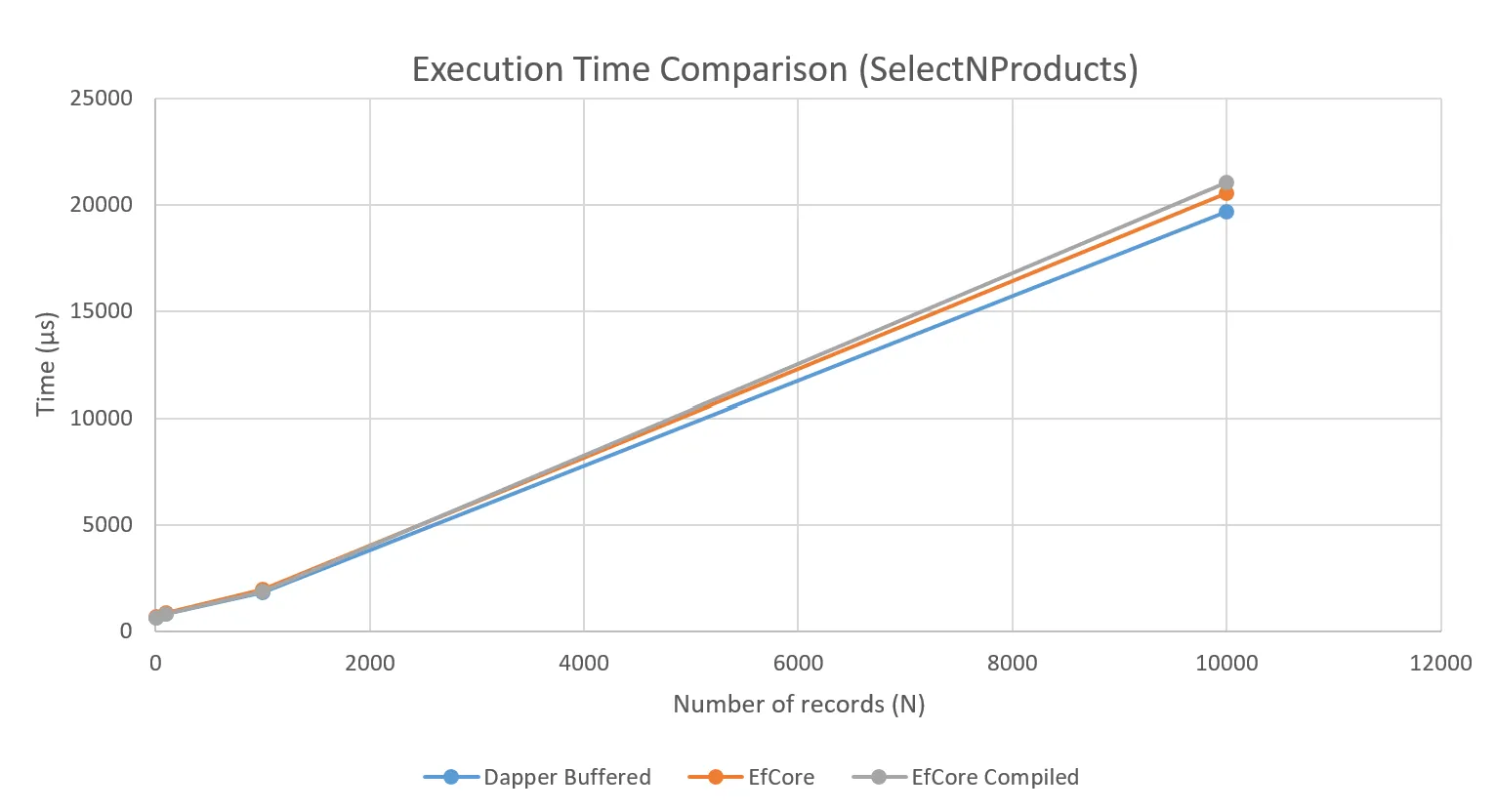
Figure 3. SelectNProducts execution time growth as the number of selected records increases.
This suggests that for straightforward bulk reads, the database work and data transfer can dominate the total cost. The ORM overhead still exists, but it becomes a smaller part of the total operation.
JOIN-Heavy Queries: Dapper Pulls Ahead
The strongest difference appeared in join-heavy queries.
The benchmark selected orders with their order items, increasing the size of the object graph that had to be materialized in memory.
This is exactly where EF Core has more work to do. It has to translate LINQ, materialize entities, handle relationships, and manage internal state. Even with no-tracking enabled, there is still more abstraction involved compared with direct SQL mapping.
Dapper, on the other hand, executes explicit SQL and maps rows into simple objects with less internal machinery.
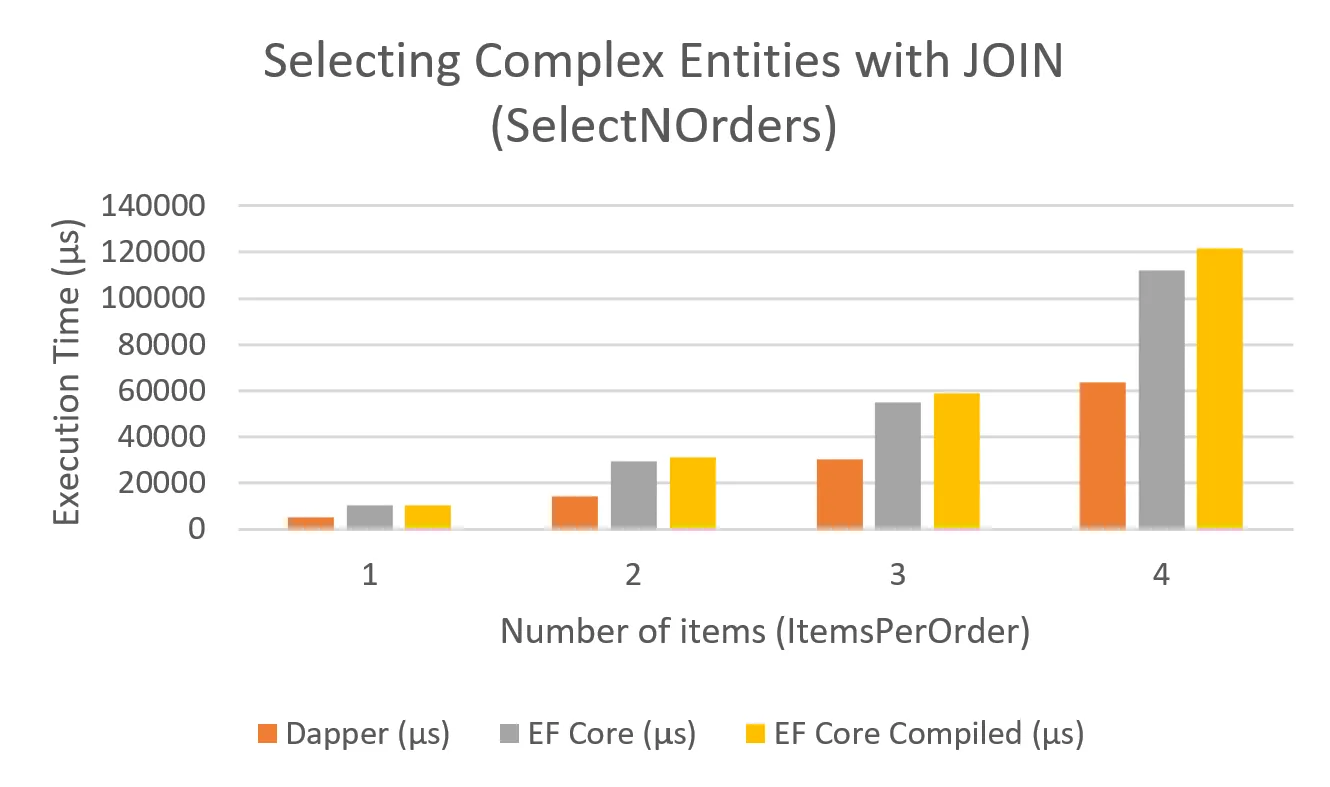
Figure 4. SelectNOrders execution time for Dapper, EF Core, and EF Core compiled queries with different ItemsPerOrder values.
In the representative join-heavy scenario, Dapper had a time advantage of about 51.2%.
This does not mean EF Core is bad. It means that large object graphs and JOIN-heavy reads are exactly the kind of workload where abstraction overhead becomes visible.
Query Complexity and Speedup
To better visualize the relationship between data volume and query complexity, we also used a speedup heat map.
The speedup factor was calculated as:
EF Core time / Dapper timeSo a value of 2.0 means EF Core took roughly twice as long as Dapper in that scenario.
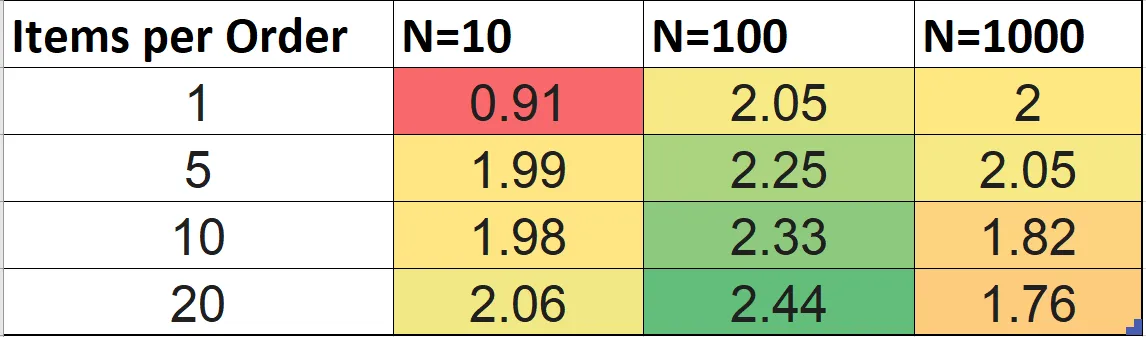
Figure 5. Speedup factor across different data volumes and ItemsPerOrder values.
The heat map makes the pattern easier to see: Dapper tends to benefit more as query complexity grows, especially when more rows need to be joined and materialized.
Parallel Reads: Allocations Become More Important
The benchmark also included a high-concurrency read scenario with a degree of parallelism of 128.
In this case, execution time was almost the same between EF Core and Dapper. The time advantage for Dapper was only around 0.5%.
But memory allocation told a different story.
Dapper allocated less memory under contention, which can matter in real services where many requests are processed at the same time.
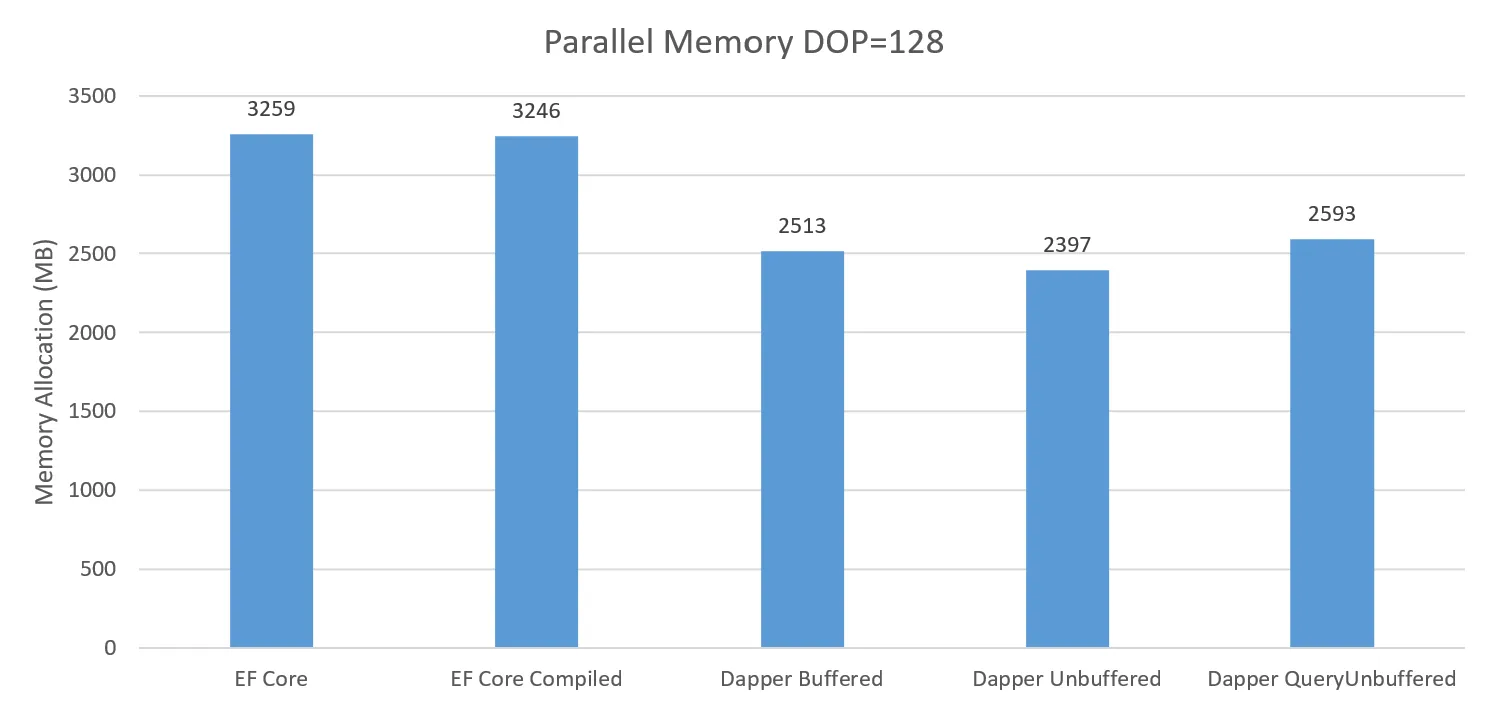
Figure 6. Memory allocation for parallel selection at DOP = 128.
This is one of the key takeaways: performance is not only about mean latency. Allocation pressure can affect garbage collection, response-time variance, and production stability.
Summary of Results
The benchmark used a combined performance index that considered both execution time and memory allocations. This index favored approaches that were not only faster, but also more memory-efficient.
| Scenario | Dapper Time Advantage | PI Dapper | PI EF Core Compiled |
|---|---|---|---|
| SelectOne simple | 8.4% | 1.5 | 1.3 |
| SelectOne with filter | 16.4% | 1.66 | 1.43 |
| SelectN, 1000 records | 6.7% | 1.16 | 1.03 |
| SelectN with JOIN | 51.2% | 2.28 | 0.97 |
| UpdateOne simple | 31.6% | 1.97 | 1.28 |
| UpdateOne complex | 48.3% | 2.5 | 1.3 |
| Parallel query, DOP = 128 | 0.5% | 1.12 | 1.0 |
The highest Dapper advantages appeared in join-heavy selection, complex updates, and allocation-sensitive parallel workloads.
What This Means for Architecture
The conclusion is not “always use Dapper.”
A better conclusion is:
Use the data-access approach that matches the workload.
EF Core is a strong choice when productivity, maintainability, migrations, rich domain modeling, and change tracking are more important than squeezing out every allocation.
Dapper is a strong choice when the application has latency-sensitive paths, large read models, JOIN-heavy queries, high allocation pressure, or explicit SQL that must be tightly controlled.
In practice, many systems can use both.
For example:
- Use EF Core for administrative CRUD, internal tools, and business workflows where maintainability matters more.
- Use Dapper for hot read paths, reporting queries, high-throughput endpoints, and complex SQL where you want full control over the query shape.
This hybrid approach is often more realistic than forcing one technology across the entire system.
EF Core Compiled Queries Help, But Only Partially
EF Core compiled queries reduced overhead in some read scenarios, but they did not fundamentally change the allocation profile.
That is because query compilation is only one part of EF Core’s cost.
Other costs remain:
- entity materialization;
- relationship handling;
- change tracking configuration;
- state management;
- abstraction overhead.
Compiled queries are useful, but they are not a magic switch that turns EF Core into Dapper.
Dapper Is Faster, But Not Free
Dapper gives more control, but that control comes with responsibility.
When using Dapper, developers must manage SQL correctness, parameterization, mapping discipline, schema changes, duplicated query logic, transaction boundaries, and consistency between SQL and application models.
With EF Core, many of these concerns are handled by the framework. With Dapper, your team owns them.
So the architectural trade-off is clear:
Dapper can reduce runtime overhead, but EF Core can reduce development overhead.
The right choice depends on which cost is more important for your system.
Final Takeaway
In our benchmark, Dapper consistently reduced managed allocations and often improved mean latency. The largest benefits appeared in complex object graph retrieval and update scenarios.
EF Core compiled queries improved some read paths, but they did not significantly reduce memory allocation in the tested configuration.
For performance-critical .NET services, especially those under high load, data-access technology should be selected based on actual workload characteristics rather than habit or preference.
If your main constraint is developer productivity, EF Core is usually a good default.
If your main constraint is memory pressure, latency stability, or complex SQL performance, Dapper deserves serious consideration.
The most practical architecture is often not EF Core versus Dapper.
It is EF Core where abstraction helps, and Dapper where control matters.